
Rack vs Tower vs Blade: Choosing an HPE Server Form Factor
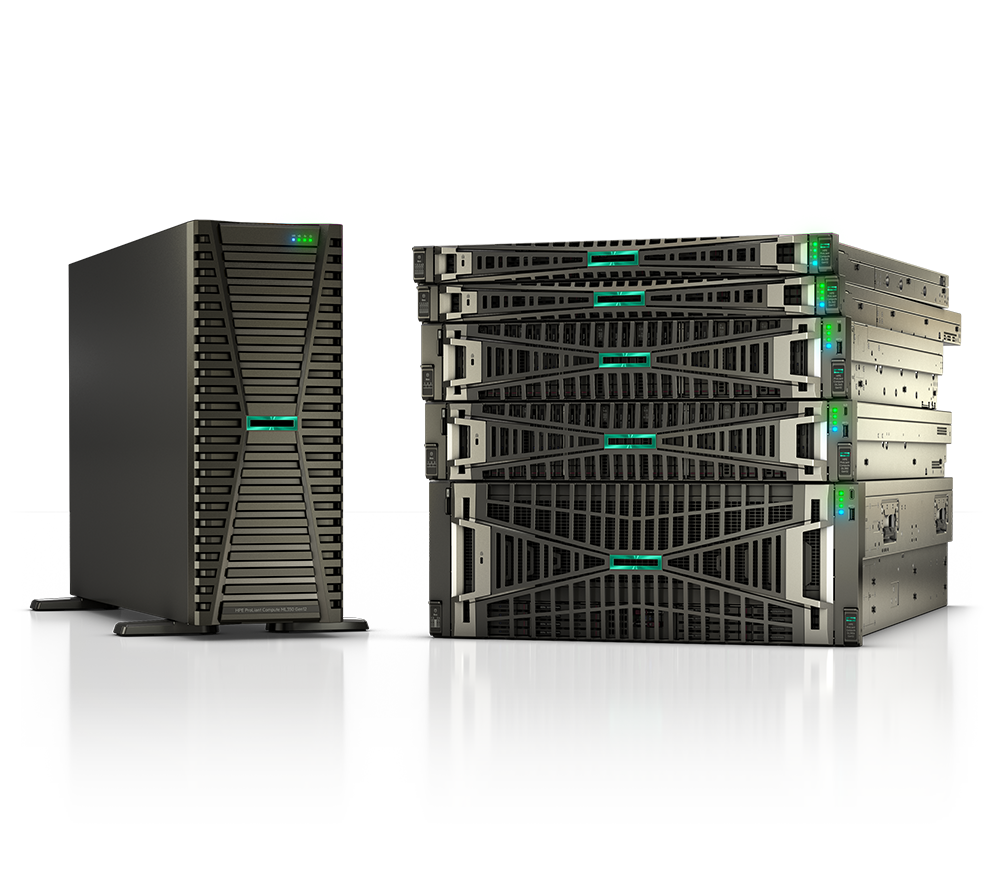
Choosing the right server form factor is one of the most consequential infrastructure decisions your organization will make. The wrong choice means years of living with rack sprawl, wasted floor space, cooling headaches, or a platform that cannot scale to meet demand. HPE's current Gen11 portfolio — spanning rack, tower, and Synergy composable blade — gives buyers more capable options than ever, but "more options" can mean more confusion.
This guide breaks down each form factor honestly, maps HPE's current product lines to real-world use cases, and provides a practical decision framework whether you are outfitting a remote clinic, a SLED data center, or a federal agency consolidating legacy infrastructure. If you already know what you need, browse the full HPE compute catalog at Uniqcli or request a quote to start configuring.
What Each Form Factor Actually Means
Before comparing speeds and feeds, it helps to anchor the vocabulary.
- Tower servers are self-contained, upright chassis — essentially enterprise-grade desktops. They stand independently, require no rack, and are serviced from the front or side panels.
- Rack servers are horizontal 1U–4U chassis designed to mount in a standard 19-inch equipment rack. Each unit is independent but shares the physical rack's power distribution and cable management.
- Blade servers are thin compute modules that slide into a shared chassis (HPE's current platform is called the Synergy frame). The chassis provides shared power, cooling, networking fabric, and management infrastructure for all compute modules inside it.
The form factor is not just about shape — it determines density, cabling complexity, upfront cost, management overhead, and ultimately total cost of ownership (TCO) over the server's lifecycle. HPE's naming convention reflects these distinctions directly: ML (Modular Large) designates tower servers, DL (Density Line) designates rack servers, and Synergy is HPE's composable blade platform.
HPE Tower Servers: When Simplicity Wins
Tower servers often get dismissed as "small-business gear," but that undersells a capable product family. The HPE Gen11 tower lineup spans from an ultra-compact microserver to a dual-socket machine powerful enough for mid-sized virtualization stacks.
Current HPE Gen11 Tower Models:
- HPE ProLiant MicroServer Gen11 — Ultra-compact, affordable entry server. Ideal for SOHO, branch offices, or edge use cases where a full rack is impractical.
- HPE ProLiant ML30 Gen11 / ML30 Gen11 Plus — Single-processor tower powered by Intel Xeon E processors, up to 128 GB DDR5 ECC UDIMM, and PCIe Gen5. Supports up to 4 LFF or 8 SFF drives with up to 80 TB raw storage capacity. Designed for small offices, remote/branch sites, and point-of-sale or light virtualization workloads.
- HPE ProLiant ML110 Gen11 — A single-processor tower that punches well above its class. Supports 4th and 5th Gen Intel Xeon Scalable processors, up to 1,536 GB DDR5 SmartMemory, four PCIe Gen5 x16 slots, and up to 16 SFF drives. Notably, it converts to a rack-mount chassis using 5.5U of rack space — a useful hedge if your infrastructure footprint changes.
- HPE ProLiant ML350 Gen11 — The flagship tower. Dual-processor, up to 64 cores per socket, up to 8 TB DDR5, PCIe Gen5, GPU support, and EDSFF storage options. Also available with an optional rackable chassis. Well-suited for ERP/CRM, VDI, data management, and medium-scale virtualization in environments where rack infrastructure is not yet available.
When tower servers make sense:
- Deploying one or two servers at a remote clinic, branch office, or school site with no existing rack infrastructure
- Environments where noise and cooling plant are limited — tower servers typically run quieter than rack-mounted hardware
- IT teams without dedicated data center staff, where the familiar desktop-style form factor simplifies day-to-day administration
- Capital-constrained SLED organizations buying a server at a time rather than planning full rack deployments
- Organizations that want to preserve future rackability without committing today (the ML110 and ML350 convertible chassis options address this directly)
Where towers fall short: Managing more than four or five towers becomes a cable and logistics challenge. Each unit requires its own KVM connection, power circuit, and network ports. At scale, that operational overhead erodes whatever hardware savings you achieved on day one.
HPE Rack Servers: The Data Center Workhorse
Rack servers are the dominant form factor for enterprise data centers, colocation facilities, and government compute environments for good reason. They balance density, flexibility, independent upgradability, and a well-understood cabling model at a price point that scales economically.
Current HPE Gen11 Rack Highlights:
- HPE ProLiant DL20 Gen11 — Compact 1U server optimized for edge and remote workloads. Supports Intel Xeon E processors. The right choice for sites that need enterprise-grade security and remote management in the smallest possible footprint.
- HPE ProLiant DL360 Gen11 — 1U, dual-socket server supporting 4th and 5th Gen Intel Xeon Scalable processors up to 64 cores, up to 8 TB DDR5 memory, 20 EDSFF NVMe drives, and PCIe Gen5 I/O. The go-to for compute-dense workloads where floor space is at a premium: web serving, databases, containerized workloads, and high-frequency analytics.
- HPE ProLiant DL380 Gen11 — The 2U workhorse of the ProLiant rack lineup. Same processor family as the DL360 but trades some density for significantly expanded storage capacity — up to 36 E3.S SSDs in front bays. Ideal for virtualization hosts, private cloud, and mixed workloads that need both compute and storage headroom in a single chassis.
- HPE ProLiant DL145 Gen11 — 2U server powered by AMD EPYC 8005-series processors, offering up to 84 energy-efficient cores. A strong choice when per-core software licensing costs make AMD's higher core-count platforms financially attractive for workloads like databases or virtualization.
- HPE ProLiant DL560 Gen11 — A 4-socket, 2U server delivering up to 16 TB DDR5 memory, six PCIe Gen5 slots, and two OCP slots. Designed for in-memory databases, mission-critical transactional workloads, and high-density virtualization requiring NUMA-aware memory architectures.
When rack servers make sense:
- Organizations with an existing rack environment or clear budget for one
- Workloads requiring a wide range of storage and GPU configurations — each DL-series unit is independently configurable per its own role
- Heterogeneous environments mixing compute, GPU, storage, and networking nodes in the same racks
- Environments where individual server independence is operationally important — a failed DL380 can be swapped without impacting adjacent units
- Production workloads requiring high availability with redundant power, hot-swap drives, and shared rack-level power distribution
Where rack servers fall short: As node counts grow past fifteen or twenty servers, cabling complexity increases significantly. Each rack server requires its own power connections, network uplinks, and out-of-band management ports. The operational burden of firmware updates, configuration audits, and lifecycle management scales linearly with node count unless you invest in management tooling like HPE OneView or Compute Ops Management.
For additional guidance on the rack server comparison within the DL lineup, see our DL360 vs DL380 deep-dive on the Uniqcli blog.
HPE Synergy Blades: Composable Infrastructure at Scale
HPE's blade strategy has evolved substantially. The legacy BladeSystem c-Class (c3000 and c7000 enclosures with BL-series blades) remains in field deployment but is not the focus for new investments. HPE's current blade platform is HPE Synergy, a composable infrastructure system that unifies compute, storage, and fabric under a single software-defined management plane called HPE OneView.
HPE Synergy 480 Gen11 Compute Module is the primary current blade compute node:
- Half-height form factor, 2-socket design
- Supports 4th and 5th Gen Intel Xeon Scalable processors up to 64 cores at 350W TDP
- Up to 4 TB DDR5 per processor across 16 DIMM slots, with memory speeds up to 5,600 MHz
- PCIe Gen5 connectivity for improved compute-to-network bandwidth
- Flexible storage controller options including the SR416ie-m Gen11
- HPE iLO 6 embedded management built in
Multiple Synergy 480 Gen11 modules slide into the HPE Synergy 12000 Frame, which provides shared power, cooling, management infrastructure, and high-speed fabric interconnects to all compute modules in the frame — dramatically reducing the per-node cabling burden compared to equivalent rack deployments.
What makes Synergy meaningfully different from traditional blades:
- A unified API (HPE OneView) lets administrators compose fluid pools of physical compute, storage, and fabric resources on demand — without physical recabling. This is critical for DevOps teams running CI/CD pipelines or agencies that need to rapidly deploy workloads across security domains.
- Server Profile templates in OneView enforce hardware configuration baselines across every compute module, ensuring consistent, auditable deployments — a strong operational and compliance advantage for regulated environments.
- Shared chassis infrastructure (power supplies, cooling, management modules) amortizes fixed infrastructure costs across many compute nodes, improving overall power usage effectiveness (PUE) at scale.
- Integrates with HPE GreenLake for organizations pursuing as-a-service consumption models while retaining on-premises data sovereignty.
When Synergy blades make sense:
- Data centers deploying ten or more compute nodes that benefit from shared chassis infrastructure
- Large virtualization or private cloud environments where workload mobility and rapid re-provisioning are operationally valuable
- Federal agencies or healthcare systems managing multiple security domains that need consistent, auditable server profiles deployable from templates
- High-density environments where reducing cable count and improving per-rack watt efficiency are genuine priorities
- Organizations already running HPE Synergy frames that are expanding or refreshing existing blade deployments
Where Synergy falls short: The Synergy 12000 Frame represents a substantial upfront investment. For organizations with fewer than six to eight compute modules, the economics rarely pencil out against equivalent rack servers. Additionally, individual Synergy modules are less independently customizable than standalone DL-series servers — a feature for consistency, but a constraint when managing highly heterogeneous workload mixes requiring unique storage or GPU configurations per node.
Form Factor Comparison at a Glance
| Factor | Tower (ML) | Rack (DL) | Synergy Blade |
|---|---|---|---|
| Upfront cost per node | Lowest | Moderate | Highest (chassis cost amortized) |
| Density (nodes per sq ft) | Low | Medium | High |
| Cabling complexity | Minimal | Moderate | Low (shared chassis fabric) |
| Scalability | Limited | Good | Excellent |
| Workload flexibility per node | Moderate | High | Moderate |
| Management overhead at scale | High | Moderate | Low (OneView + profiles) |
| GPU and accelerator support | Limited (ML350) | Excellent (DL380, DL560) | Moderate |
| Cooling requirements | Low — office-friendly | Moderate — server room needed | High — data center required |
| Minimum viable deployment | 1 server | 1 server | 6–12+ modules |
| Convertible between types | Yes (ML110, ML350) | No | No |
| Best fit | ROBO, branch, SMB, edge | Enterprise, mixed workloads | Large-scale, composable data centers |
Power, Cooling, and Physical Infrastructure Requirements
Form factor selection is inseparable from the physical data center environment. A few practical considerations for each tier:
Tower servers typically draw between 200W and 750W per unit and operate in standard office environments with no specialized cooling beyond normal HVAC. They generate moderate noise — acceptable in a server closet, potentially disruptive in an open office or classroom setting.
Rack servers draw anywhere from 200W to 1,000W+ per 1U–2U node depending on CPU thermal design power (TDP) and storage configuration. A fully populated 42U rack can draw 15–25 kW, requiring a dedicated power distribution unit (PDU), proper hot/cold aisle management, and computer room air conditioning. Organizations without this infrastructure face prerequisite investment before the first rack server is even powered on.
Synergy blades concentrate power and heat into the chassis. A fully populated Synergy 12000 Frame can approach 20+ kW in a compact footprint. This demands precisely managed airflow and in the densest configurations, may warrant supplemental liquid cooling consideration. The trade-off is that chassis-level fans and power supplies are shared across many compute modules, so per-compute-node power efficiency typically improves versus equivalent standalone rack configurations at equivalent workload densities.
For federal and SLED buyers, data center power and cooling constraints frequently drive form factor selection as much as workload requirements. Facilities with aging raised-floor data centers may be constrained to lower-density rack configurations until infrastructure modernization occurs. The HPE ProLiant Gen11 lineup across all form factors supports the Flexible Slot Power Supply architecture with high-efficiency 80 PLUS Platinum and Titanium ratings, helping organizations maximize the value of every kilowatt drawn from existing power infrastructure.
Security and Compliance Across All Three Form Factors
All HPE ProLiant Gen11 platforms — tower, rack, and Synergy blade — ship with HPE Silicon Root of Trust, a hardware-anchored security mechanism that cryptographically validates firmware integrity from power-on. This is embedded in the iLO 6 ASIC and cannot be bypassed, even by an attacker with physical access and the ability to reflash firmware. This is not a software feature that can be disabled; it is a structural property of the silicon.
Beyond hardware-level security, form factor affects compliance posture in several practical ways:
- Synergy deployments with HPE OneView Server Profile templates can enforce hardware configurations at scale, ensuring no compute module is deployed outside an approved baseline. This directly supports compliance with FISMA, NIST SP 800-53, and FedRAMP-aligned baseline requirements where configuration consistency and auditability are audited controls.
- Tower servers deployed at remote sites are physically harder to secure without dedicated, locked server rooms. Physical security controls — locked cabinets, cable locks, access logging — become important compensating controls under HIPAA, CMMC, and related frameworks.
- Rack environments in government or healthcare data centers benefit from existing physical access controls and can leverage HPE iLO 6 for network-isolated out-of-band management — a critical capability for environments implementing zero-trust access models where in-band management channels are restricted.
HPE's consistent security architecture across all Gen11 form factors means your hardware security baseline does not change based on chassis type. That is a meaningful operational advantage compared to mixing vendors where security capabilities vary platform by platform.
For additional information on hardening HPE servers for regulated environments, see our HPE compute guides.
Total Cost of Ownership: Looking Beyond Sticker Price
Upfront hardware price is only part of the TCO story. A rigorous analysis for a three-to-five-year infrastructure lifecycle should account for:
- Power costs: Modern Gen11 servers deliver materially better performance-per-watt than Gen10 predecessors. Organizations still running Gen10 or earlier hardware should model the consolidation math before assuming Gen11 purchases are simply additive cost.
- Management labor: Each rack server requires individual configuration, firmware updates, and lifecycle management tasks. HPE Compute Ops Management (COM) and OneView reduce this per-node burden significantly. Synergy's template-driven management scales sub-linearly with node count — a real advantage at 20+ nodes.
- Cabling and switching: Synergy blades internalize much of the east-west fabric. Rack deployments require top-of-rack switches, patch panels, and cabling for every node. At 20+ servers, this is a non-trivial infrastructure line item.
- Refresh cycles: Tower and rack servers are independently refreshable with no dependencies. Synergy compute modules refresh independently from the chassis, but chassis-level upgrades require evaluating module compatibility — a constraint to factor into any five-year roadmap.
- Warranty and support: HPE offers Care Pack support tiers across all form factors, including next-business-day on-site service. Federal and SLED buyers should evaluate on-site support tiers carefully for remote tower deployments where the nearest HPE service center may be geographically distant.
Matching Form Factor to Buyer Profile
The right form factor depends on your environment, not a vendor's preference. Use this as a starting point:
Remote/branch office, clinic, or school site: Tower servers — specifically the ML30 Gen11, ML110 Gen11, or ML350 Gen11 — are the right starting point. Minimal infrastructure prerequisites, familiar management, and low upfront investment.
Small-to-mid-size enterprise or SLED data center (5–30 nodes): Rack servers, primarily DL360 Gen11 for compute-dense workloads or DL380 Gen11 for mixed compute/storage. DL560 Gen11 for environments running in-memory workloads or highly consolidated virtualization stacks where four-socket memory capacity matters.
Federal agency or large healthcare system (30+ nodes, private cloud, rapid provisioning requirements): HPE Synergy with 480 Gen11 compute modules warrants a serious evaluation. OneView's template-driven management, composable resource pools, and consistent server profiles address both scale and compliance requirements more effectively than equivalent independently managed rack deployments.
AI inference and GPU-accelerated workloads: Rack servers — particularly the DL380 Gen11 with its broad PCIe Gen5 and accelerator card support — typically offer the most flexibility. HPE's newer ProLiant Compute Gen12 edge platforms targeting Intel Xeon 6 are also worth watching as they become more broadly available.
Cost-constrained buyers evaluating AMD: The DL145 Gen11 with AMD EPYC 8005 processors delivers competitive core counts and memory bandwidth at attractive price points, particularly for workloads where per-core software licensing makes AMD's higher core density financially advantageous.
Explore HPE server options across all form factors in the Uniqcli compute catalog or use the shop to compare configurations directly.
How Uniqcli Helps
Selecting the right HPE server form factor involves more variables than any guide can fully capture — your existing infrastructure, power capacity, licensing model, security certification requirements, and budget horizon all matter. As an authorized HPE and HPE Aruba Networking partner serving federal, SLED, healthcare, and enterprise customers, Uniqcli's team evaluates options honestly, provides access to contract pricing vehicles, and helps right-size configurations before you commit.
If a tower server is the right answer for your remote site, we will tell you. If your environment is ready for HPE Synergy composable infrastructure, we can configure and quote it accurately. We work from your requirements, not from a quota.
Request a quote or contact our team to start the conversation. We typically turn around initial configuration recommendations within one business day.