
"Aruba CX Switch Selection Guide: Matching 6000, 8000, 9300, and 10000 to Access, Aggregation, and Core"
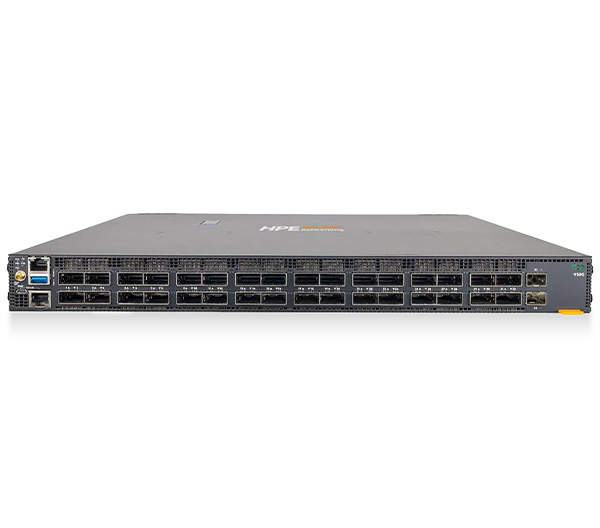
The HPE Aruba Networking CX portfolio spans everything from a closet access switch to a DPU-accelerated data center leaf, and every model runs the same AOS-CX operating system. That consistency is a gift for operations teams but a trap for buyers, because the spec sheets blur together and it is easy to over-buy at the edge or under-buy at the core. This Aruba CX switch guide walks the portfolio layer by layer so you can match the right tier to campus access, aggregation, and data center core, and write a bill of materials you can defend in a budget review.
How the Aruba CX portfolio is organized
AOS-CX gives you one CLI, one API, and one management model (HPE Aruba Networking Central or the on-prem alternative) across the whole line. The differentiation is not the software, it is silicon, port speed, table sizes, redundancy, and feature licensing. Think of the family in four bands:
- 6000 family (6000 / 6100 / 6200 / 6300 / 6400) — campus access and light aggregation.
- 8000 family (8100 / 8325 / 8360 / 8400) — campus core, aggregation, and data center leaf/spine.
- 9300 — high-density 400GbE data center leaf and spine.
- 10000 — data center top-of-rack with an embedded AMD Pensando DPU for inline stateful services.
When buyers ask us about CX 6300 vs 8360, or Aruba 9300 vs 10000, the answer almost always comes down to which network layer the switch lives in. Get the layer right and the model nearly picks itself.
Access layer: 6000, 6100, 6200, and 6300
The access layer connects users, APs, phones, cameras, and IoT. Your decisions here are PoE budget, multigigabit (Smart Rate) ports for Wi-Fi 6E/7 uplinks, stacking, and Layer 3 capability.
- 6000 / 6100 / 6200 — value access switches for branch, small sites, and standard wired endpoints. Good when you need clean managed L2/L3-lite ports without heavy stacking or high PoE density.
- 6300 — the workhorse access and small-aggregation switch. It supports multigigabit ports, up to 90W (PoE++ / Class 6) on 48-port models, and the Aruba Virtual Stacking Framework for managing a stack of switches as one. This is the right pick for a modern wiring closet feeding Wi-Fi 6E/7 APs and PoE devices.
Pick 6300 when you need higher PoE budgets, multigigabit uplinks for next-gen APs, or resilient stacking; step down to 6100/6200 for cost-sensitive standard-PoE closets.
Aggregation and campus core: 6400 and 8000
Aggregation collapses many access switches into a resilient distribution or core layer, usually with VSX (Aruba's active-active redundancy) so a switch or link failure does not drop the campus.
- 6400 — modular chassis for campus aggregation and core, with high-density 10/40/100GbE line cards. Good when you want one resilient chassis instead of many fixed boxes, plus room to grow ports over time.
- 8100 — fixed campus aggregation/core with EVPN-VXLAN support, a strong fit for distributed campus fabrics that do not need top-tier data center throughput.
- 8325 / 8360 — fixed 1U high-performance switches with 10/25/40/100GbE. The 8325 is a classic campus-core and data center leaf/spine platform with EVPN-VXLAN; the 8360 brings AI-driven core and cloud-networking capabilities. Both pair in VSX for active-active resilience.
- 8400 — modular chassis with very high capacity for large campus core or data center spine where port density and headroom matter.
On the common CX 6300 vs 8360 question: 6300 is access (and edge-of-stack aggregation), while 8360 is a core/aggregation and data center class switch with far higher throughput, deeper tables, and 100GbE-plus uplinks. They are not substitutes; they are adjacent layers.
Data center core: 9300 and 10000
The data center is where the newest CX models earn their place, and where the Aruba 9300 vs 10000 decision gets interesting.
- 9300 — a 1U fixed switch built for high-density 400GbE. It is a clean, fast leaf or spine for modern data center and AI fabrics where you need raw throughput and standard L2/L3 plus EVPN-VXLAN, without embedded security services.
- 10000 — the industry's first DPU-enabled switch, combining AOS-CX with a fully programmable AMD Pensando DPU. It delivers stateful services inline at wire rate: distributed east-west segmentation and firewalling, NAT, encryption, and rich telemetry, with scale that traditional L2/L3 switches cannot match in software.
Choose 9300 when you need maximum 400GbE port density for a spine/leaf fabric and your security is handled elsewhere. Choose 10000 when you want to collapse east-west firewalling and microsegmentation into the top-of-rack switch itself, which is compelling for zero-trust data center designs, healthcare environments with strict east-west controls, and distributed or colocated centers of data.
How to choose: a quick selection table
Use the layer first, then size by speed, PoE, and redundancy. The table below summarizes typical fit.
| Network layer | Best-fit CX series | Typical port speeds | Why you pick it |
|---|---|---|---|
| Branch / value access | 6000 / 6100 / 6200 | 1GbE access, 10GbE uplinks | Cost-sensitive standard-PoE closets |
| Modern campus access | 6300 | Multigigabit access, up to 90W PoE, stacking | Wi-Fi 6E/7 APs, PoE-heavy edge, stacked management |
| Campus aggregation / core | 6400, 8100, 8325, 8360 | 10/25/40/100GbE | VSX resilience, EVPN-VXLAN campus fabric |
| Large core / DC spine | 8400 | 100/400GbE | High density and headroom in a modular chassis |
| DC leaf / spine (400G) | 9300 | up to 400GbE | High-density 400G fabric, no embedded DPU |
| DC top-of-rack with security | 10000 | 10/25/100GbE + DPU | Inline stateful segmentation, firewalling, encryption |
A practical sizing checklist for your BOM: count endpoints and required PoE wattage per closet, confirm multigigabit needs from your AP model, decide whether aggregation needs a chassis (6400/8400) or fixed VSX pair (8100/8325/8360), and at the core decide whether security belongs in the switch (10000) or the fabric (9300). When you are weighing two adjacent models, our side-by-side compare view lays out ports, speeds, and PoE next to each other.
How Uniqcli helps
Uniqcli is an authorized HPE and HPE Aruba Networking reseller, and we scope CX switch designs end to end for federal, SLED, healthcare, and enterprise buyers. That starts with a layer-by-layer design review, where we right-size access PoE, validate VSX and EVPN-VXLAN aggregation, and confirm whether your data center core needs the 9300 or the DPU-enabled 10000 before anyone cuts a PO.
On procurement, we deliver TAA-compliant configurations and quote through the vehicles you already use, including GSA, SEWP, and E-Rate for eligible education buyers, with clear lead times and lifecycle (support and warranty) options spelled out. Browse the products line or the full catalog to confirm models and SKUs, then request a configured, line-item quote and we will return a defensible BOM with the right CX tiers for each layer. We can also stage, configure with your AOS-CX golden config, and support deployment so the gear shows up ready to rack.
FAQ
What is the difference between CX 6300 and 8360? The 6300 is a campus access and edge-aggregation switch with multigigabit ports, high PoE, and stacking. The 8360 is a core/aggregation and data center class 1U switch with much higher throughput, deeper tables, and 100GbE-class uplinks. They serve different layers and are not interchangeable.
Should I buy the Aruba 9300 or 10000 for my data center? Choose the 9300 for high-density 400GbE leaf/spine when security is handled elsewhere in the fabric. Choose the 10000 when you want stateful east-west firewalling, microsegmentation, NAT, and encryption delivered inline by the switch's embedded AMD Pensando DPU.
Do all Aruba CX switches run the same software? Yes. The entire CX line runs AOS-CX with a common CLI, REST API, and management model, so operational skills and automation carry across access, aggregation, and core tiers.
Can Uniqcli supply Aruba CX switches on a government contract vehicle? Yes. We provide TAA-compliant CX configurations and can quote through GSA, SEWP, and E-Rate (for eligible buyers), with documented lead times and support options. Start with a quote and we will match the right tier to each network layer.